사전 작업(YOLOv8 설치)
- pytorch를 먼저 설치
- pip install ultralytics
- 주피터노트북에서 실행할 경우 프로그래스바를 실행하기 위해서 다음을 설치한다. (필수는 아님)
- pip install ipywidgets` or `conda install -y -c conda-forge ipywidgets
!pip3 install torch torchvision torchaudio
!pip install ultralytics
사용
- CLI (command line interface)에서 터미널 명령어로 추론/평가/학습을 진행할 수 있다.
- Python lib 를 이용해 코드상에 원하는 추론/평가/학습을 진행할 수 있다.
CLI 기본 명령어 구조
- 구문
- yolo task=detect|classify|segment|pose mode=train|val|predict model=yolov8n.yaml|yolov8n.pt|.. args
- task: [detect, classify, segment, pose] 중 하나를 지정한다. [optional]로 생략하면 모델을 보고 추측해서 task를 정한다.
- detect: Object detection
- classify: Image classification
- segment: Instance segmentation
- pose Pose estimation
mode: [train, val, predict, export] 중 하나를 지정한다. 필수로 입력해야 한다.
- train: custom dataset을 train 시킨다.
- val: 모델 성능을 평가한다.
- predict: 입력 이미지에 대한 추론을 한다.
- export: 모델을 다른 형식으로 변환한다.
model: pretrained 모델이나 모델 설정 yaml 파일의 경로를 설정한다. 필수로 입력해야 한다.
- pretrained 모델 파일경로
- task에 맞는 pretrained 모델파일의 저장 경로를 지정한다.
- transfer learnging을 하거나 fine tuning 시 방법
- 모델 구조 설정 yaml 파일 경로
- task에 맞는 pretrained 모델 설정파일(yaml파일)의 경로를 지정한다.
- train mode에서 지정하며 모델을 새로 생성해서 처음부터 학습 시킬 경우 지정한다.
- Ultralytics에서 제공하는 Pretrained 모델
- 모델 크기에 따라 5개의 모델을 제공하며 큰 모델은 작은 모델에 비해 추론 성능이 좋은대신 속도는 느리다.
- 모델은 처음 추론또는 학습할때 local 컴퓨터에 없으면 download 받는다.
- https://github.com/ultralytics/ultralytics#models - 확장자가 pt이면 pretrained 된 모델을, yaml이면 모델 구조 설정파일을 download하여 실행한다.
- pretrained model은 fine tuning이나 추론할 때, yaml설정파일은 처음부터 학습할 경우 설정하여 받는다. - args: task와 mode과 관련한 추가 설정값들을 지정한다.
- https://docs.ultralytics.com/cfg/
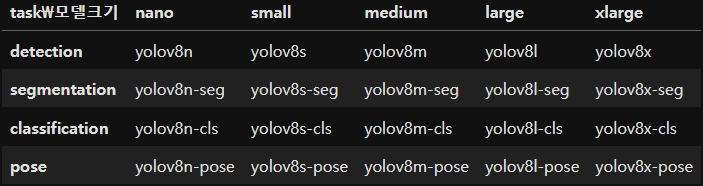
Object Detection
Predict (추론)
모델로딩
- Ultralytics에서 제공하는 Pretrained Model이나 직접 학습시킨 모델을 이용해 추론한다.
- Ultralytics는 Object Detection을 위한 Pretrained 모델을 제공한다.
- Object Detection 모델은 COCO dataset으로 학습되었다.
- 모델 명을 지정하면 자동으로 다운로드를 받는다.
CLI
yolo task=detect mode=predict model=model_path source=추론할_image_path
- 추가 설정 (configuration)
- https://docs.ultralytics.com/cfg
- argument 설정은 name=value 형식으로 한다. (--name value나 name value 는 안된다.)
추론 할 Source 타입
- https://docs.ultralytics.com/modes/predict/#inference-sources
- Image: 이미지파일경로, URL, PIL.Image, np.ndarray, torch.Tensor
- 동영상: 동영상파일경로, 유튜브 URL, 웹캠(0)
- 여러개의 영상처리: 디렉토리 경로 또는 경로들을 원소로 가지는 리스트.
yolo 형식
yolo task=detect     # 어떤 작업을 할지
     mode=predict    # 그 작업안에서 어떤 일을 할지
     model=models/yolov8s.pt # fine tuning시 사용할 모델
# 옵션
     source=01_test_image/1.jpg # mode=predict에서 추론할 대상경로
     save=True                  # 결과를 표현한 이미지 저장 여부
     save_txt=True              # 결과 라벨파일 저장 여부
     line_width=1               # bounding box(bbox) 선 굵기
     conf=0.7                   # confidence threshold (c_score가 지정한 값 이상인 것만 표현)
yolo를 통해 사진 detection
- jupyter lab으로 실행
- CLI사용시 코드에서 !빼기
- save=True -> 결과 파일이 runs 디렉토리에 저장된다.
!yolo task=detect mode=predict model=models/yolov8s.pt source=01_test_image/1.jpg save=True save_txt=True line_width=1 conf=0.7
yolo를 통해 동영상 detection
!yolo task=detect mode=predict model=models/yolov8n.pt source=01_test_image/indo_street.mp4 save=True
yolo를 통해 webcam detection
!yolo task=detect mode=predict model=models/yolov8n.pt source=0 show=True # 정수-web cam idpython ultralytics version 확인
import ultralytics
from ultralytics import YOLO # 모델 클래스

ultralytics.__version__
모델 생성하여 임의의 사진 추론하기
- 사전학습된 모델파일의 경로를 지정한다. (없으면 다운로드한다.)
- 추론할 사진의 경로를 지정
# 모델 생성
model = YOLO("models/yolov8n.pt") # 객체 생성시 pretrained 모델파일의 경로를 지정. (없으면 다운로드)
                                  # task => 설정한 모델 파일에 따라서 결정.

# 추론
image_path = "01_test_image/1.jpg"
results = model(image_path) # 추론 -> 필요한 설정들을 파라미터로 지정.
추론한 사진 결과 확인하기
- plt 활용
import matplotlib.pyplot as plt
import cv2

plt.imshow(results[0].plot()[:,:,::-1]) # 원본이미지에 추론 결과를 표시한 결과 이미지를 반환. (ndarray: bgr모드)
- cv2 활용
cv2.imshow("f", results[0].plot())
cv2.waitKey()
cv2.destroyAllWindows()
임의의 web의 이미지 경로를 지정하여 사진 추론
# web상 이미지 추론 -> url 지정
url = "https://cdn.jejusori.net/news/photo/201906/303604_304163_245.jpg"
r = model(url, save=True)
한번에 여러장 추론하기
- 이미지들이 있는 디렉토리 경로를 전달.
- 추론할 파일경로를 리스트로 묶어서 추론한다.
-이 경우 추론성능이 좋지 않은 경우가 생긴다.(YOLO 초기버전의 경우, 현재는 상관X)
glob 활용
- /* -> 01_test_image 디렉토리 안의 모든 jpg파일을 지정
from glob import glob
img_list = glob("01_test_image/*.jpg")
img_list
여러장 추론하기
- Results saved to runs\detect\predict2 -> 결과가 디렉토리에 저장된다.
# 리스트로 여러장 추론
r = model(img_list, save=True)
경로 지정을 통한 여러장 추론
# 경로 지정을 통한 여러장 추론
r2 = model("02_test_image/", save=True)
동영상
- source에 동영상 파일 경로를 지정한다.
- frame 단위로 추론한다.
동영상 frame 단위로 추론 및 저장
- save=True -> 디렉토리에 저장한다.
- show=True -> 추론한 동영상 출력
r = model("01_test_image/indo_street.mp4", save=True, show=True)
len(r) -> frame 수가 출력된다.
len(r) # 350 -> frame
[:,:,::-1] -> BGR2RGB
plt.imshow(r[-1].plot()[:,:,::-1]);
추론결과
ultralytics.yolo.engine.results.Results
- 모델의 추론 결과는 list에 이미지별 예측결과를 Results에 담아 반환한다.
- Results : 한개 이미지에 대한 추론결과를 담는 객체
- 추론 종류에 따라 다음 속성을 이용해 결과를 조회한다.
- Detection: result.boxes - Boxes type
- Segmentation: result.masks - Masks type
- Classification: result.probs - torch.Tensor type
- Pose estimator: result.keypoints - Keypoints type - 추가 정보
- Results.orig_img: 추론한 원본 이미지
- Results.orig_shape: 추론한 원본 이미지의 크기 (height, width)
- Results.path: 추론한 원본이미지의 경로
- Results.names: class2classname 정의한 딕셔너리 (key: 클래스, name: 클래스 이름) - 메소드
- Results.plot(): 원본 이미지에 추론결과를 표현한 이미지를 ndarray로 반환. (opencv를 이용해서 만들기 때문에 BGR 모드로 반환)
from ultralytics import YOLO

model = YOLO("models/yolov8s.pt")
result_list = model("01_test_image/1.jpg", conf=0.7)
print('총 이미지수:', len(result_list))
result = result_list[0] # 첫번째 이미지에 대한 결과
print(type(result))
print("원본이미지 경로:", result.path)
print("원본이미지 size:", result.orig_shape) # (height, width)
print("원본이미지:", type(result.orig_img), result.orig_img.shape, result.orig_img.dtype)
import matplotlib.pyplot as plt

plt.imshow(result.orig_img[:,:,::-1]); # [:,:,::-1]: BGR -> RGB
pprint
# class
from pprint import pprint # 자료구조를 보기좋게 출력하는 함수(정렬).
pprint(result.names) # key: index(class), name: class name ===> 모델이 학습한 데이터의 idx2class를 반환
Object Detection 결과값 조회
- ultralytics.yolo.engine.results.Boxes에 추론 결과를 담아 반환
- Results.boxes로 조회 - 주요 속성
- shape: 결과 shape. (찾은 물체개수, 6)
- boxes
- 6: 좌상단 x, 좌상단 y, 우하단 x, 우하단 y, confidence score, label
- xyxy
- bounding box의 좌상단 x, 좌상단 y, 우하단 x, 우하단 y 좌표 반환
- xyxyn
- xyxy를 이미지 대비 비율로 반환
- xywh
- bounding box의 center x, center y, 너비, 높이 를 반환
- xywhn
- xywh를 이미지 대비 비율로 반환
- cls: 찾은 물체의 label
- conf: cls에 대한 confidence score (그 물체일 확률)
- 0차원 torch.Tensor 를 상수로 변환
- tensor.item() - N차원 torch.Tensor를 ndarray로 변환
- tensor.numpy()
- Tensor객체가 GPU메모리에 있을 경우 메인메모리(CPU)로 먼저 옮겨야 한다.
- tensor.to('cpu')` or `tensor.cpu()
bbox 위치와 object class
# result = result_list[0]
boxes = result.boxes
print(type(boxes)) # Object Detection 결과 -> bbox 위치와 object class
찾은 object 정보
# 찾은 object 정보
print(boxes.cls.shape) # boxes.cls: object class(index) => [8] => 찾은 object가 8개. 8개 class
print(boxes.cls)
찾은 object의 class 확률.
print(boxes.conf.shape) # 찾은 object의 class 확률.
boxes.conf
찾은 object의 class명과 확률
for c, p in zip(boxes.cls, boxes.conf):
    print(f"{int(c)} - {result.names[c.item()]}, {p*100:.3f}%")
bbox 위치 - xyxy : 좌상단 x,y, 우하단 x,y 좌표
- shape: [8: 찾은 object 개수, 4: 좌표-좌상단xy, 우하단xy]
# bbox 위치 - xyxy : 좌상단 x,y, 우하단 x,y 좌표
print(boxes.xyxy, boxes.xyxy.shape, sep="\n") # shape: [8: 찾은 object 개수, 4: 좌표-좌상단xy, 우하단xy]
xyxyn
- 0 ~ 1 normalize(정규화) -> 이미지 크기 대비 비율.
print(boxes.xyxyn, boxes.xyxyn.shape, sep="\n") # 0 ~ 1 normalize(정규화) -> 이미지 크기 대비 비율.
bbox 위치 - xywh : center x y 좌표, bbox의 너비, 높이
# bbox 위치 - xywh : center x y 좌표, bbox의 너비, 높이
print(boxes.xywh, boxes.xywh.shape, sep="\n")
print(boxes.xywhn, boxes.xywhn.shape, sep="\n") # xywhn => normalize
bbox를 활용한 이미지 추론
# 원본 이미지에 bbox를 치고 class를 출력
import cv2
from ultralytics import YOLO

# 1. 모델 생성
model = YOLO("models/yolov8s.pt")
# 2, 추론
result_list = model("01_test_image/1.jpg", conf=0.7)
# 3. 추론결과를 이용한 추가 작업 ==> bbox 그리기.

result = result_list[0]

# 원본이미지를 복사
org_img = result.orig_img
img = org_img.copy()

# bbox 추론결과를 조회
boxes = result.boxes
xyxy_list = boxes.xyxy # 좌상단, 우하단 좌표(bbox 위치)
cls_list = boxes.cls   # class index
conf_list = boxes.conf # class 확률

for xyxy, cls, conf in zip(xyxy_list, cls_list, conf_list):
    pt1 = xyxy[:2].to("cpu").numpy().astype("int32") # 좌상단만 가져와서 numpy로 변환 !tensor -> ndarray로 변환시 -> CPU로 이동시킨 후 변환이 가능하다.
    pt2 = xyxy[2:].to("cpu").numpy().astype("int32") # 우하단 좌표
    cls_name = result.names[int(cls.item())] # list의 index는 정수여야 한다.
    txt = f"{cls_name}-{conf.item()*100:.2f}%"

    # image에 bbox
    cv2.rectangle(img, pt1=pt1, pt2=pt2, color=(255, 255, 255), thickness=1)
    # label text
    cv2.putText(img, text=txt, org=pt1-5, fontFace=cv2.FONT_HERSHEY_COMPLEX, fontScale=0.5, color=(255, 255, 255), thickness=1, lineType=cv2.LINE_AA)

# img 출력
cv2.imshow("result", img)
cv2.waitKey()
cv2.destroyAllWindows()
웹캠 입력 디텍션
import cv2
from ultralytics import YOLO

# 웹캠 연결
cap = cv2.VideoCapture(0)
#### YOLO 모델 생성
model = YOLO("models/yolov8n.pt")

while cap.isOpened():
    # 한 frame(이미지)을 읽기
    succ, frame = cap.read()
    if not succ:
        print("웹캠 연결에 문제가 생겼습니다.")
        break
    # flip(대칭)
    frame = cv2.flip(frame, 1) # 양수: 좌우, 0: 상하, 음수: 상하좌우
    ###############################################
    # YOLO 모델을 이용한 추론 -> 결과 이미지 생성
    ###############################################
    img = cv2.cvtColor(frame, cv2.COLOR_BGR2RGB) # yolo는 rgb 이미지를 학습시킨다.

    # 추론. 추론대상이미지타입 - 문자열(경로), Image(ndarray, PIL.Image)
    result = model(img,
                   conf=0.5,  # 확률이 0.5 이상인 것만 결과로 리턴
                   verbose=False)[0] # 추론 결과 로그를 출력하지 않는다.

    # 결과에서 위치, 클래스 정보 추출
    ### (찾은 object 개수, shape)
    xyxy_list = result.boxes.xyxy.to("cpu").numpy().astype("int32")
    cls_list = result.boxes.cls.to("cpu").numpy().astype("int32")
    conf_list = result.boxes.conf.to("cpu").numpy()

    # for in 문을 이용해 찾은 object 별로 bbox 처리를 한다.
    for xyxy, cls, conf in zip(xyxy_list, cls_list, conf_list):
        pt1, pt2 = xyxy[:2], xyxy[2:]
        txt = f"{result.names[cls]} - {conf*100:.3f}%"
        # box
        cv2.rectangle(frame, pt1, pt2, color=(255, 0, 0), thickness=2)
        cv2.putText(frame, txt, org=pt1, fontFace=cv2.FONT_HERSHEY_COMPLEX, fontScale=1, color=(200,0,0), thickness=1, lineType=cv2.LINE_AA)

    # 영상 출력
    cv2.imshow("frame", frame)
    # 중단여부확인
    if cv2.waitKey(1) == 27: # ESC를 입력하면
        break
# 마무리
cap.release() # 웹캠연결 종료
cv2.destroyAllWindows() # 출력 윈도우 종료'Data_Analysis_Track_33 > Python' 카테고리의 다른 글
| Python_Computer_vision_03(yolov8_segmentation) (0) | 2023.11.09 |
|---|---|
| Python_Computer_vision_02(yolov8_customdataset_train 실습) (0) | 2023.11.08 |
| Python_Deeplearning_pytorch_12(DCGan_실습) (1) | 2023.11.03 |
| Python_Deeplearning_pytorch_11(LSTM을 활용한 주가예측) (1) | 2023.11.03 |
| Python_Deeplearning_pytorch_10(RNN, LSTM) (1) | 2023.11.03 |

