데이터 현황 자료
SRS
최종보고서
1조_ROADs_최종보고서_v1.0.pptx
15.41MB
내 파트 중 가장 공수가 오래 걸리고 집중적으로 짠 부분
flowchart
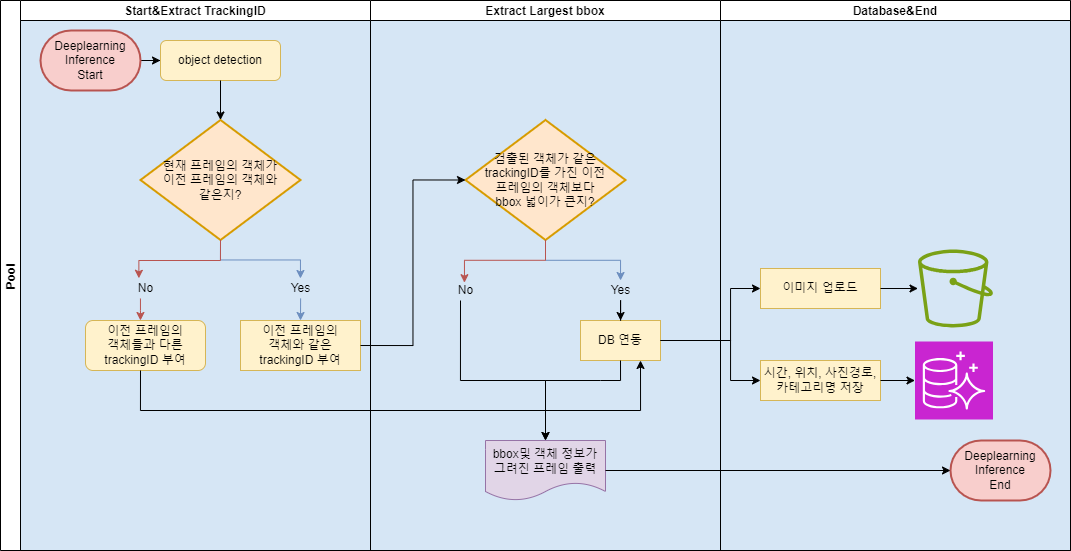
최종코드
- app.py 파일
# app_IoU_v3.0
from flask import Flask, render_template, Response
import os
import numpy as np
import cv2
import glob
from ultralytics import YOLO
from PIL import ImageFont, ImageDraw, Image
import psycopg2
from datetime import datetime
import requests
import boto3

# AWS 계정 정보
aws_access_key_id = 'aws_access_key_id'
aws_secret_access_key = 'aws_secret_access_key'
aws_region = 'aws_region'
bucket_name = 'bucket_name'

# AWS S3 클라이언트 생성
s3_client = boto3.client('s3',
                         aws_access_key_id=aws_access_key_id,
                         aws_secret_access_key=aws_secret_access_key,
                         region_name=aws_region)

# IoU 계산식
def IoU(box1, box2):
    # box = (x1, y1, x2, y2)
    box1_area = (box1[2] - box1[0] + 1) * (box1[3] - box1[1] + 1)
    box2_area = (box2[2] - box2[0] + 1) * (box2[3] - box2[1] + 1)

    # obtain x1, y1, x2, y2 of the intersection
    x1 = max(box1[0], box2[0])
    y1 = max(box1[1], box2[1])
    x2 = min(box1[2], box2[2])
    y2 = min(box1[3], box2[3])

    # compute the width and height of the intersection
    w = max(0, x2 - x1 + 1)
    h = max(0, y2 - y1 + 1)

    inter = w * h
    iou = inter / (box1_area + box2_area - inter)
    return iou

# GPS 정보를 수집, DB에 저장하고, 이미지를 S3에 업로드, 그 경로를 DB에 저장하는 함수
# transfer_data(cursor, conn, s3_client, bucket_name, output_path, category_name) 으로 전달받는다.
def transfer_data(cursor, conn, s3_client, bucket_name, local_image_path, category_name, frame_count, f_id): # local_image_path -> 저장될 이름
    # 현재 pc가 위치한 gps좌표 수집
    response = requests.get('https://ipinfo.io')
    data = response.json()

    location = data.get('loc')
    if location:
        lat, long = location.split(',')
    else:
        print("위치 정보를 가져올 수 없습니다.")

    # 현재 날짜시간정보 수집
    current_datetime = datetime.now()

    # 'data' 테이블에 GPS 정보, 날짜, S3 경로 저장
    s3_object_key = f'finalprojectimage/{os.path.basename(local_image_path)}'
    s3_url = f'https://{bucket_name}.s3.ap-northeast-2.amazonaws.com/{s3_object_key}'

    # postgresql 데이터 update
    delete_query = "DELETE FROM facility_info WHERE photo_info LIKE %s"
    insert_query = 'INSERT INTO facility_info (latitude, longitude, creation_time, photo_info, category_id) VALUES (%s, %s, %s, %s, %s)'
    values = (lat, long, current_datetime, s3_url, category_name)


    print(local_image_path, bucket_name, s3_object_key)
    # s3에서 데이터 update
    # S3 버킷 내에서 특정 트래킹 ID를 가진 파일들의 키 찾기
    suffix = 'track_{}.jpg'.format(f_id)
    print("suffix:", suffix)

    objects_to_delete = []
    response = s3_client.list_objects_v2(Bucket=bucket_name)

    # 파일 찾기
    for obj in response.get('Contents', []):
        if obj['Key'].endswith(suffix):
            objects_to_delete.append({'Key': obj['Key']})

    # 찾은 파일 삭제
    for obj in objects_to_delete:
        s3_client.delete_object(Bucket=bucket_name, Key=obj['Key'])

    print(f"{len(objects_to_delete)} files with suffix {suffix} deleted.")

    # s3에 이미지 업로드
    s3_client.upload_file(local_image_path, bucket_name, s3_object_key)
    print(f"Image uploaded to S3: {s3_object_key}")

    cursor.execute(delete_query, ('%track_{}.jpg%'.format(f_id),))
    cursor.execute(insert_query, values)
    conn.commit()

label2id = {'etc': 0,
            'PE드럼 정상': 1,
            'PE드럼 파손': 2,
            'PE방호벽 정상': 3,
            'PE방호벽 파손': 4,
            'PE안내봉 정상': 5,
            'PE안내봉 파손': 6,
            '라바콘 정상': 7,
            '라바콘 파손': 8,
            '시선유도봉 정상': 9,
            '시선유도봉 파손': 10,
            '제설함 정상': 11,
            '제설함 파손': 12,
            'PE입간판 정상': 13,
            'PE입간판 파손': 14,
            'PE휀스 정상': 15,
            'PE휀스 파손': 16}

# 반대로도 매핑할 수 있도록 딕셔너리 뒤집기!
id2label = {v: k for k, v in label2id.items()}

##### Flask 연결 #####
app = Flask(__name__)

@app.route('/')
def image_show():
    return render_template('image_show.html')
#####################

def gen_frames():

    image_directory = r"C:\Users\dltls\OneDrive\바탕 화면\final project\scene_dir\scene6" # 연속된 이미지들이 저장되어 있는 scene 디렉토리
    output_folder_path = r"C:\Users\dltls\OneDrive\바탕 화면\final project\output_frame_IoUtracking" # 로컬에 사진이 저장될 디렉토리
    cropped_output_folder_path = r"C:\Users\dltls\OneDrive\바탕 화면\final project\cropped_output_frame" # crop 결과 저장 디렉토리

    test_paths = []
    for filename in sorted(os.listdir(image_directory), key=lambda x: int(x.split("_")[1].split(".")[0])):
        if filename.endswith(".jpg") and filename.startswith("frame_"):
            file_path = os.path.join(image_directory, filename)
            test_paths.append(file_path)

    DET_COLOR = [(0, 255, 0)]
    DET_CONF = 0.3
    DET_IN_SIZE = 640

    trackinfo_list = [] # 전체 track_info 정보를 저장
    trackingID_count = 1 # for문안에서 한 프레임에 대한 detect된 객체들의 정보를 담을 Track_info에서 track_ID를 부여하기 위한 count
    frame_count = -1 # trackinfo_list와 trackinfo_list_frame을 비교하기위한 변수(트래킹 기능)

    large_bbox = {} # 가장 크기가 큰 bbox의 정보를 얻기 위한 dict
    large_bbox_info = [] # 각각의 객체의 bbox의 크기가 가장 클 때의 정보 (TrackingID, bbox좌표, class, confidence, frame)
    current_frame_trackID = {}

    # 한글 설정
    font_path = r"C:\Users\dltls\pydev\workspace\pyflask\NanumGothic.ttf"  # 사용할 한글 폰트 파일의 경로로 변경해야 합니다.
    font_size = 24
    font = ImageFont.truetype(font_path, font_size)

    # 모델 초기화
    model = YOLO("best_cls_eq.pt") # 클래스 균등하게 학습한 모델
    # model = YOLO("best.pt") # 3만장 학습한 모델

    #### PostgreSQL DB 연결 #####
    db_params = {'dbname': 'dbname',
                 'user': 'user',
                 'password': 'password',
                 'host': 'host',
                 'port': 'port'
                }

    conn = psycopg2.connect(**db_params)
    cursor = conn.cursor()
    #############################

    # 각 이미지에 대해 처리 및 결과 시각화
    for image_file in test_paths:

        '''
        trackinfo_list_frame
        for문 안에서 한 프레임의 track_info 정보를 저장 -> 한 프레임에서 detect된 객체들의 정보를 프레임 마다 update를 위해 for문 안에 list 선언
        '''
        trackinfo_list_frame = []

        # 이미지 파일 경로
        image_path = os.path.join(image_directory, image_file)
        frame = cv2.imread(image_path)

        # YOLO 모델을 이용한 추론 -> 결과 이미지 생성
        result = model(image_path, conf=DET_CONF, verbose=False, imgsz=DET_IN_SIZE)[0]

        xyxy_list = result.boxes.xyxy.to("cpu").numpy().astype("int32")
        cls_list = result.boxes.cls.to("cpu").numpy().astype("int32")
        conf_list = result.boxes.conf.to("cpu").numpy()

        # 프레임 마다의 bbox좌표, cls, conf를 Track_info dict에 저장
        for bbox, clss, conf in zip(xyxy_list, cls_list, conf_list): # 튜플로 저장하는 방식으로

            '''
            Track_info
            현재 프레임의 detect된 각각의 객체의 track_ID, bbox좌표, class, conf
            ex) (1, array([1106,  188, 1250,  264]), 14, 0.9024881)
            '''

            Track_info = (int(trackingID_count), bbox, clss, conf)

            # detect된 객체 class가 정상일 경우 trackinfo_list_frame에 추가 하지 않도록
            if Track_info[2] == 1 or Track_info[2] == 3 or Track_info[2] == 5 or Track_info[2] == 7 or Track_info[2] == 9 or Track_info[2] == 11 or Track_info[2] == 13 or Track_info[2] == 15:
                continue

            '''
            trackinfo_list_frame
            현재 프레임의 detect된 객체들의 정보들을 가진다
            ex)[(1, array([1106,  188, 1250,  264]), 14, 0.9024881),
            (2, array([806,   0, 953,  88]), 13, 0.46560714),
            (3, array([806,   0, 952,  88]), 14, 0.3099545)]
            trackinfo_list_frame[0][0] -> 한 프레임에서 첫번째로 detect된 객체의 TrackingID
            trackinfo_list_frame[0][1] -> 한 프레임에서 첫번째로 detect된 객체의 bbox (x y w h)
            trackinfo_list_frame[0][2] -> 한 프레임에서 첫번째로 detect된 객체의 class
            trackinfo_list_frame[0][3] -> 한 프레임에서 첫번째로 detect된 객체의 confidence
            trackinfo_list_frame[1][0] -> 한 프레임에서 두번째로 detect된 객체의 TrackingID
            trackinfo_list_frame[1][1] -> 한 프레임에서 두번째로 detect된 객체의 bbox (x y w h) ....
            '''

            current_frame_trackID[trackingID_count] = 0 # 현재 프레임에서 detect된 객체 trackingID

            trackinfo_list_frame.append(Track_info)

            trackingID_count = trackingID_count + 1 # tracking_id 1씩 더하는 부분

        '''
        trackinfo_list
        한 프레임에서 detect된 객체들의 정보를 전체적으로 누적시키며 저장
        프레임이 지나면서 track_info_list에 저장된 정보와 track_info_list_frame의 정보와 비교하여 tracking을 구현하기 위함 (IoU활용)
        처음 프레임에서는 tracking기능이 되지 않도록 조건 주기(이전 프레임이 없기에 detect된 객체들은 모두 새로운 객체들이기 때문)
        ex) trackinfo_list[0] -> 첫번째 frame에서 detect된 객체들의 정보들
        trackinfo_list[0][0] -> 첫번째 frame에서 첫번째로 detect된 객체의 정보들
        trackinfo_list[0][0][0] -> 첫번째 frame에서 첫번째로 detect된 객체의 TrackingID ....
        trackinfo_list_frame에서 넘겨 받은 리스트에 아무런 값이 없을 때는 append하지 않는다.
        '''

        # trackinfo_list_frame에서 넘겨 받은 리스트에 아무런 값이 없을 때는 append하지 않는다.
        if trackinfo_list_frame == []:
            continue
        else:
            trackinfo_list.append(trackinfo_list_frame)

        frame_count = frame_count + 1

        '''
        trackinfo_list와 trackinfo_list_frame 비교 로직 구현
        trackinfo_list_frame의 객체들(이번 프레임의 객체들의 정보)과 trackinfo_list의 객체(이전 프레임의 객체들의 정보)를 비교
        비교하는 객체 간의 IoU가 기준치(0.1) 보다 크고(and) class가 같다면 trackinfo_list_frame의 객체에게 비교 대상과 같은 TrackingID 부여
         - 이중 for문으로 각각의 객체들의 IoU계산, class비교
        조건에 만족하지 않는다면 trackinfo_list_frame의 trackingID는 하나 올라가는 식으로 (새로운 객체의 출현을 의미한다.)
        '''

        ## trackinfo_list와 trackinfo_list_frame 비교
        if frame_count >= 1: # 두번째 프레임부터 이전 프레임과 비교
            object_count = 0 # 몇번째 객체인지(if문 시작할 때마다 0으로 초기화)

            print(f"{frame_count+1}번째 프레임")

            for f_id, f_bbox, f_clss, f_conf in trackinfo_list_frame:

                for g_id, g_bbox, g_clss, g_conf in trackinfo_list[frame_count-1]: # trackinfo_list[frame_count-1]: 이전 프레임

                    ## IoU>threshold && same clss 결과보면서 IoU threshold 조정하기
                    if IoU(f_bbox, g_bbox) > 0.1 and f_clss == g_clss:
                        ## update --> trackinfo_list_frame의 TrackingID update (비교대상과 같도록)
                        trackinfo_list_frame[object_count] = list((trackinfo_list_frame[object_count]))
                        trackinfo_list_frame[object_count][0] = g_id # trackingID 이전 프레임과 같도록 update

                        trackingID_count =  g_id + 1 # trackingID_count 재정의

                object_count = object_count + 1

        # trackinfo_list에 값이 너무 많이 쌓여 프로그램이 느려질 수 있다.
        if frame_count >= 6:
            # trackinfo_list[frame_count-6]의 값을 빈 리스트로 갱신
            trackinfo_list[frame_count-6] = []

        '''
        trackingID의 bbox 크기가 가장 큰 부분 찾기
        '''

        for f_id, f_bbox, f_clss, f_conf in trackinfo_list_frame:
            pt1, pt2 = f_bbox[:2], f_bbox[2:]
            area = (pt2[0] - pt1[0]) * (pt2[1] - pt1[1])

            if f_id not in large_bbox or area > large_bbox[f_id]:
                large_bbox[f_id] = area # bbox 최대 크기 update
                # bbox가 가장 클 때의 정보들 append
                # 이미 같은 f_id가 있으면 해당 정보들 삭제
                large_bbox_info = [info for info in large_bbox_info if info[0] != f_id]
                # 해당 f_id의 정보 append (프레임 정보도 추가)
                image_file = test_paths[frame_count]  # 현재 프레임의 이미지 파일명
                frame_path = os.path.join(image_directory, image_file)  # 현재 프레임의 이미지 파일 경로
                large_bbox_info.append([f_id, f_bbox, f_clss, f_conf, frame_count, frame_path])
                large_bbox_info.sort(key=lambda x: x[0]) # 트래킹ID 순으로 정렬


                '''
                output_path에 저장될 파일 이름이 저장되어 있다(jpg)
                현재 large_bbox_info의 정보 수정이 될 때마다(bbox 최대크기가 수정될때마다) 사진이 저장되는 로직
                large_bbox_info의 정보 수정이 될 때마다(bbox 최대크기가 수정될때마다) 사진이 저장되는 상태에서 같은 trackingID를 가진 사진 파일을 삭제하고
                더 큰 bbox를 가진 trackingID의 사진을 저장하는 식으로 했다.
                '''


                # 저장될 사진 파일 이름 정의
                output_path = os.path.join(output_folder_path, f'frame_{frame_count}_track_{f_id}.jpg')

                # 같은 트래킹ID를 가진 사진 파일 삭제
                existing_image_pattern = os.path.join(output_folder_path, f'frame_*_track_{f_id}.jpg')
                existing_images = glob.glob(existing_image_pattern)
                for existing_image_path in existing_images:
                    os.remove(existing_image_path)
                    print(f"이전 이미지를 삭제했습니다: {existing_image_path}")

                # 이미지를 PIL 이미지로 변환
                pil_img = Image.fromarray(cv2.cvtColor(frame, cv2.COLOR_BGR2RGB))
                draw = ImageDraw.Draw(pil_img)

                # 결과 이미지 그리기
                draw.rectangle([pt1[0], pt1[1], pt2[0], pt2[1]], outline=(0, 255, 0), width=2)
                draw.text((pt1[0], pt1[1]), f"TrackID: {f_id} class: {id2label[f_clss]} - {f_conf * 100:.3f}%", font=font, fill=(0, 255, 0))
                # PIL 이미지를 다시 OpenCV 이미지로 변환
                frame_with_bbox = cv2.cvtColor(np.array(pil_img), cv2.COLOR_RGB2BGR)


                # 결과 이미지 저장(로컬 디렉토리에)
                cv2.imwrite(output_path, frame_with_bbox)


                # 결과 이미지 저장(AWS, posetgresql)
                print(f"저장될 파일 이름: {output_path}")
                transfer_data(cursor, conn, s3_client, bucket_name, output_path, id2label[f_clss], frame_count, f_id) # f_id를 transfer_data함수에서 써야함

                ############# [추가!!!] bbox 부분만 crop해서 저장 ########################
                cropped_frame = frame_with_bbox[f_bbox[1]:f_bbox[3], f_bbox[0]:f_bbox[2]]
                cropped_output_path = os.path.join(cropped_output_folder_path, f'crop_frame_{frame_count}_track_{f_id}.jpg')
                cv2.imwrite(cropped_output_path, cropped_frame)
                print(f'Crop_Saved: {cropped_output_path} for Track ID: {f_id}')

                # 다음 프레임에 출력할 crop된 이미지 저장!!
                prev_cropped_path = cropped_output_path
                ######################################################################

            # 결과확인
            print(f"TrackingID 별 largeest_bbox 크기: {large_bbox}")
            print(f"최대 크기 bbox를 가진 객체 정보: {large_bbox_info}")


        '''
        감지된 객체 그리기
        TrackingID update가 반영된 객체 그리기
        '''

        ##################### [추가!!!] 테두리 그려서 좌측상단에 출력 ####################
        # 테두리 그릴 영역 설정!!
        border_size = 15
        color = [0, 0, 255]  # 빨강!!

        if prev_cropped_path is not None:
            prev_cropped_frame = cv2.imread(prev_cropped_path)
            resized_prev_cropped_frame = cv2.resize(prev_cropped_frame, (400, 300)) # (가로, 세로)

            top, bottom, left, right = 50, 315+2*border_size, 50, 415+2*border_size
            frame[50:350, 50:450] = resized_prev_cropped_frame
            cv2.rectangle(frame, (left, top), (right, bottom), (0, 0, 255), border_size)  # 테두리 그리기
        #############################################################################

        # 이미지를 PIL 이미지로 변환
        pil_img = Image.fromarray(cv2.cvtColor(frame, cv2.COLOR_BGR2RGB))
        draw = ImageDraw.Draw(pil_img)


        obj_count = 0 # 프레임에 detect된 객체 수만큼 그리기
        while True:
            if obj_count == len(trackinfo_list_frame):
                break
            pt1,pt2 = trackinfo_list_frame[obj_count][1][:2], trackinfo_list_frame[obj_count][1][2:]
            txt = f"TrackID: {trackinfo_list_frame[obj_count][0]} class: {id2label[trackinfo_list_frame[obj_count][2]]} - {trackinfo_list_frame[obj_count][3]*100:.3f}%"

            draw.rectangle([pt1[0], pt1[1], pt2[0], pt2[1]], outline=(0, 255, 0), width=2)
            draw.text((pt1[0], pt1[1]), f"{txt}", font=font, fill=(0, 255, 0))


            obj_count = obj_count + 1

        frame_with_text = cv2.cvtColor(np.array(pil_img), cv2.COLOR_RGB2BGR)

        ret, buffer = cv2.imencode('.jpg', frame_with_text)
        frame = buffer.tobytes()

        yield (b'--frame\r\n'
               b'Content-Type: image/jpeg\r\n\r\n' + frame + b'\r\n')


        if cv2.waitKey(1) == 27:
            break

    # 창 닫기
    cv2.destroyAllWindows()

    # DB 연결 종료
    cursor.close()
    conn.close()

@app.route('/image')
def image():
    return Response(gen_frames(), mimetype='multipart/x-mixed-replace; boundary=frame')

if __name__ == "__main__":
    app.run(debug=True)
프로젝트 끝난 뒤 할일
- 코드 refactoring
- 저장 구조 개선 (코드 내부에 DELETE는 절대로 넣지 말자)
- 포트폴리오 정리
- VScode, Docker, AWS 등 개발 툴 공부
'프로젝트 > Data_Analysis_Track_33_FinalProject' 카테고리의 다른 글
| FinalProject_10(개별 Action 수행, webcam detect + tracking기능 구현) (0) | 2024.01.25 |
|---|---|
| FinalProject_09(개별 Action 수행, 파이썬 웹 연동) (1) | 2024.01.22 |
| FinalProject_08(개별 Action 수행, webcam detect + tracking) (0) | 2024.01.18 |
| FinalProject_07(개별 Action 수행, AWS 학습) (0) | 2024.01.16 |
| FinalProject_06(개별 Action 수행, sequential img inference) (0) | 2024.01.12 |

